
Loading and Using the NormalDistribution Package
Ken Levasseur
Mathematical Sciences
UMass Lowell
Kenneth_Levasseur@uml.edu
Loading the package
To load the NormalDistribution package, all you need to do is evaluate the following expression. The accent mark you see at two points between the quotes is the key below the "escape" key on the top left of most keyboards.
Needs["Statistics`NormalDistribution`"]
You may also substitute the nearly equivalent expression <<Statistics`NormalDistribution` to load the package. Using Needs is better because it will avoid loading the package if it is already loaded.
What's in the package
You can use the Help Browser to see what capabilities are contained in the package. Also you can get a list of functions defined by the package by evaluating the following.
| Statistics`NormalDistribution` | ||||||||
|
Using the Package
To see how to use a function, you can use the Help Browser or do the following.

Most of these examples speak for themselves.
![f = NormalDistribution[100, 20]](HTMLFiles/NormalDemo_9.gif)

![PDF[NormalDistribution[μ, σ], x]](HTMLFiles/NormalDemo_11.gif)

![PDF[f, x]](HTMLFiles/NormalDemo_13.gif)

![Plot[PDF[f, x], {x, 40, 160}]](HTMLFiles/NormalDemo_15.gif)
![[Graphics:HTMLFiles/NormalDemo_16.gif]](HTMLFiles/NormalDemo_16.gif)

![Plot[CDF[f, x], {x, 40, 160}]](HTMLFiles/NormalDemo_18.gif)
![[Graphics:HTMLFiles/NormalDemo_19.gif]](HTMLFiles/NormalDemo_19.gif)

![CDF[f, 110.]](HTMLFiles/NormalDemo_21.gif)

![Integrate[PDF[f, x], {x, 0, 110.}]](HTMLFiles/NormalDemo_23.gif)

You can generate pseudorandom numbers with specific normal distributions either individually, as we do ten times here in a table,
![Table[Random[NormalDistribution[0, 1]], {10}]](HTMLFiles/NormalDemo_25.gif)

or you can generate arrays of pseudorandom numbers. Here is a two dimensional array.
![RandomArray[NormalDistribution[0, 1], {5, 5}]](HTMLFiles/NormalDemo_27.gif)
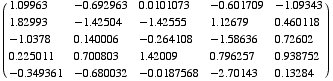
And here is a three dimensional array.
![RandomArray[NormalDistribution[0, 1], {5, 5, 2}]](HTMLFiles/NormalDemo_29.gif)

Pitfalls
This applies it all packages, not just the NormalDistribution package.
A common error once you've gotten accustomed to using a specific package is to forget to load it before using one of its functions. Here is what happens
![PDF[NormalDistribution[100, 20]]](HTMLFiles/NormalDemo_31.gif)
![PDF[NormalDistribution[100, 20]]](HTMLFiles/NormalDemo_32.gif)
Notice how the output is identical to the input, instead of the density function we got above. This kind of thing happens mostly when you've forgotten to load a package. Now if we load the package, look at what happens.
Needs["Statistics`NormalDistribution`"]


The names PDF and NormalDistribution that you used are actually different from the ones in the package. Mathematica puts names that are defined in packages into "contexts" and the names PDF and NormalDistribution that you had entered earlier are in a different context. The easiest thing to do at this point is to select "Quit Kernel" from the Kernel menu and start over again, making sure to load the package first.
| Created by Mathematica (April 6, 2006) |  |





![NormalDistribution[mu, sigma] represents the normal (Gaussian) distribution with mean mu and standard deviation sigma. More…](HTMLFiles/NormalDemo_8.gif)